
Internet connection options
Operating modes
Reference station can operate in two modes:
- GOTRACK-RTK.COM mode
In this mode reference station does not need fixed and public IP address since all correction data is sent to the gotrack-rtk.com server which is NTRIP caster and rovers (GOtrack computers) connect to the gotrack-rtk.com server not directly to the reference station.
- INDIVIDUAL mode
In this mode reference station requires FIXED and public IP address since rovers (GOtrack computers) connect directly to the station. Base station becomes NTRIP caster itself.
Depending on operating mode there are certain requirements of internet connection. Picture below shows internet connection options network requirements depending on connection type.
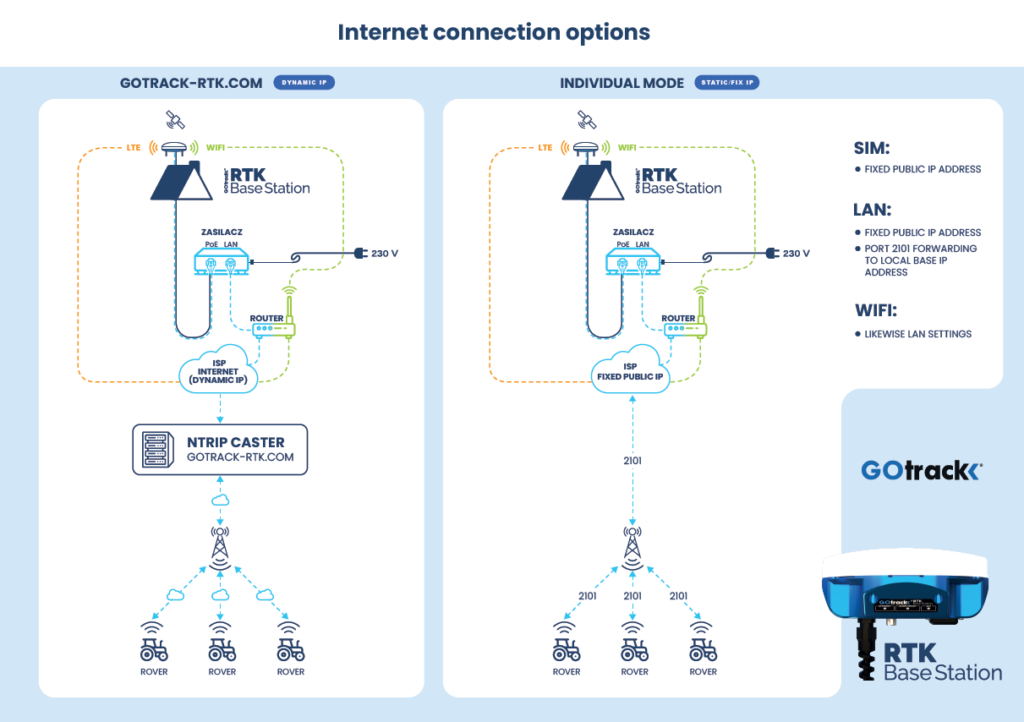
Most recommended operating mode is GOTRACK-RTK.COM since it is the easiest way to configure base station. Fixed, public IP address is not needed and no extra settings in router are demanded.
Internet connection options
Interent connection can by supplied in 3 ways:
- By LTE built-in modem.
- By ethernet / PoE cable.
- By WiFi connection.
LTE built-in modem
For proper interenet connection via LTE modem SIM card with deactivated PIN lock has to be inserted in the SIM card holder in the base station. Depending on carrier suitable APN name has to be selected in base station settings menu.
When this internet supply option ethernet cable is used only as power cable. Power supply does not need to be connected to any router.
By ethernet / PoE cable
When choosing this connection option LAN cable has to be connected between router and base station power supply. SIM card is not needed.
By WiFi connection
WiFi connection to the router can be used for interent connection. When selecting this option WiFi base station will switch from AP mode to client mode. It means direct accessing base station via WiFi connection will be not possible. When base station will connect to the local network via WiFi then connection to setup page is possible via the router.
In case accessing to base station is not possible any more it is possible to restore WiFi AP mode by pressing RESET button for 10 seconds.